Belgian players who desire a refined mobile casino journey can currently download the specialized NV Casino app on their iPhone https://nv-be.casino/fr-be/app/. Due to local gambling regulations, the app skips the App Store, but it stands protected and adjusted for iOS. This guide details the entire setup, from confirming your device to making your first bet. The method is easy and safe.
Responsible Gaming Tools and User Assistance
NV Casino prioritizes player protection on iPhone. The app has a complete range of responsible gaming tools: you can establish deposit limits, loss limits, and session time reminders right from your phone. Reality checks pop up at intervals you set, so you keep control without having to reach out to support.
Self-exclusion is available too. You can pause your account for a break period or shut it down for good. Directories to Belgian support organizations, like the Gaming Commission’s helpline, are in the app’s footer. All responsible gaming tools are located under “My Limits” in the main menu—just two taps away at most.
Customer support is available 24/7 via live chat and email. Live chat is built into the app, so you can speak with a trained agent without interrupting your play. Mean response time is under 90 seconds, and help is offered in French, Dutch, and English. There’s a detailed FAQ for common install and account questions, but it doesn’t replace the personal help you receive through direct channels.
Configuring and Trusting the NV Casino App
After the profile completes, your iPhone requires you to manually trust the certificate from the developer. This is a standard iOS security step for apps signed with an enterprise certificate. NV Casino uses a validated certificate that gets refreshed regularly, so the app keeps working and follows Apple’s rules without being on the App Store.
Enabling Trust for the Enterprise Certificate
Navigate to Settings > General > VPN & Device Management. Find the NV Casino profile under “Enterprise App” and click it. Tap “Trust NV Casino” and confirm. This enables your iPhone to open the app. The certificate is tied to the operator’s registered firm, which is licensed and regulated by the Belgian Gaming Commission.
Finalizing the Installation
Return to the home screen—the NV Casino icon is present. Select it to launch the app for the first time. The first startup might require a few extra seconds while it loads game libraries and verifies the license. Then the system will ask you to log in with your present details or create a fresh account right in the app. The whole journey, from download to playing, normally takes less than three minutes.
Device Compatibility and Device Requirements
Before installing, verify your iPhone meets the specs. The NV Casino app needs iOS 14.0 or later, and it works on all recent iPhones. Older devices are still compatible, but the best performance is achieved with an A12 Bionic chip or later. You’ll require a steady internet connection—Wi‑Fi, 4G, or 5G connectivity—for real dealer games and seamless slot gaming.
The subsequent iPhone models are officially supported and verified for flawless operation:
- iPhone 15, iPhone 15 Plus, iPhone 15 Pro, iPhone 15 Pro Max
- iPhone 14, iPhone 14 Plus, iPhone 14 Pro, iPhone 14 Pro Max
- iPhone 13, iPhone 13 mini, iPhone 13 Pro, iPhone 13 Pro Max
- iPhone 12, iPhone 12 mini, iPhone 12 Pro, iPhone 12 Pro Max
- iPhone 11, iPhone 11 Pro, iPhone 11 Pro Max
- iPhone XS, iPhone XS Max, iPhone XR, iPhone X
- iPhone 8, iPhone 8 Plus
- iPhone SE (2nd generation and later)
It is possible to install the app on an iPad device, but the layout is built for iPhone screens, thus it won’t occupy a tablet display. Maintain a minimum of 200 MB free for installation and game caching data. Leave Background App Refresh activated to receive live bonus updates and live game updates.
Steps to Download the NV Casino App on iPhone
As the NV Casino app is not available on the App Store, you install it directly from the official website. This is the method licensed Belgian casinos function—it ensures the software safe from tampering. The entire process takes a few minutes and you don’t have to have any tech skills.
Go to the Official NV Casino Website
Launch Safari or any web browser on your iPhone and navigate to the official NV Casino site. The homepage detects your device and displays a banner to set up the iOS app. Exclusively use the real site to prevent fake apps. Bookmark it so you can come back quickly and be certain the download source is genuine.
Locate the iOS Download Button
Move to the mobile section or look for the iPhone icon, typically in the footer or main menu. Press “Download for iOS.” A pop-up could ask for permission to download a configuration profile. Pick “Allow”—this profile is necessary to install the casino software safely outside the App Store.
Approve the Download
When the download starts, you’ll observe a progress bar in Safari’s download manager. The file is about 45 MB, so it ends rapidly on a normal connection. When it’s done, your iPhone opens Settings by itself to guide you through adding the profile. If you’re on Wi‑Fi, no mobile data is utilized, so it won’t add you anything extra.
For what reason Belgian Players Prefer the NV Casino iPhone App
NV Casino developed this iPhone app targeting the Belgian market. It offers French and Dutch, and all payments are in euros. In contrast with a mobile website, the native app loads faster, delivers push notifications for special promos, and features a layout you can manage with one hand. Regular updates keep it conforming with the Belgian Gaming Board’s rules, so you can enjoy hundreds of games without anxiety.
The app also operates with Face ID and Touch ID, so logging in is quick and protected. It stores your choices on the device—favorite games, payment options—without revealing personal data. Belgian players obtain local customer support right inside the app. There’s no need to jump between browser tabs or start up a desktop when you require help.
Exploring the NV Casino App Capabilities
The iPhone app delivers the entire desktop casino, exactly optimized for touch and vertical screens. You can navigate to every game category from the bottom nav panel—slots, live tables, promos. A advanced search and filter system enables you to find games by provider, theme, or characteristic like Megaways or jackpots.
Live Casino and Genuine Croupiers
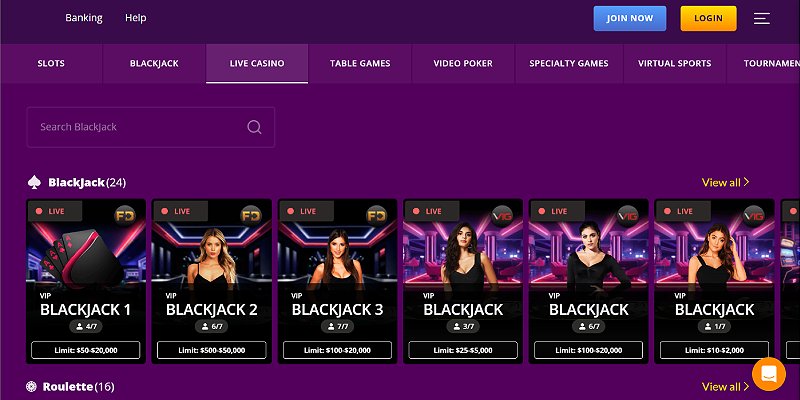
NV Casino’s live dealer section streams in HD from professional studios. You can participate in roulette, blackjack, and baccarat tables with actual croupiers who interact with you. The video player adapts to your network, so buffering remains low. Belgian players like the local-language tables during peak hours—it creates the experience feel social and immersive right on your phone.
Slot Machines and Progressive Jackpots
Over 1,200 slot titles are enhanced for iPhone, from classic fruit machines to cinematic video slots. The app operates in portrait and landscape, so you pick your layout. Progressive jackpots update live, and a dedicated tab shows the latest top prizes. Spin and autoplay controls are touch-friendly, and you can see game rules with a simple tap.
Virtual Table Games and Video Poker
Besides live games, the app features a robust lineup of virtual table games: European roulette, multi-hand blackjack, casino poker variants. Video poker fans get Jacks or Better and Deuces Wild with adjustable pay tables. Each game starts on its own, which preserves battery by closing sessions you’re not using. You can track your play with thorough stats and history panels.
Device-Exclusive Promotions
NV Casino provides app users bonuses you will not find on desktop. Consider free spins on new slots, reload offers for mobile deposits, and push alerts for time-sensitive tournaments. The promos hub changes daily, and an opt-in button guarantees you don’t miss a qualifying event. All bonus terms are presented clearly in the app’s dedicated section.
Safe Payments and Quick Withdrawals on iPhone
All money transactions in the NV Casino app use the same encryption as major Belgian banks. The cashier is designed for mobile, so deposits are immediate and withdrawals are easy. Every payment method is approved and follows anti-money laundering rules set by the Belgian Gaming Commission.
Deposit Methods for Belgian Players
You may top up with several reliable choices. The app shows the most common options for Belgian residents, so it’s convenient to get started. The minimum deposit is €10, and the money is credited in your casino balance right away. Here are the accepted transaction options:
- Bancontact
- Visa and Mastercard debit/credit cards
- Skrill
- Neteller
- Paysafecard
- Instant bank transfer via Trustly
Where possible, each method uses two-factor authentication for extra security. The app never saves your full card details on the device—it uses secure tokens through certified payment gateways.
Withdrawal Process and Timelines
Getting your winnings out is similarly straightforward. In the cashier, tap “Withdraw,” pick your method, and enter the amount. You are required to prove your identity once, as part of KYC rules. E-wallet withdrawals usually are finalized within 24 hours; bank transfers can take up to three business days. The app sends a push notification whenever your withdrawal status is modified, so you’re kept informed.
Leave a Reply